Reading Data
In the previous lesson, you set up the Next.js app, created an API key, and initialized the Webiny SDK. Now it's time to actually fetch data from Webiny and display it on the page.
In this lesson...
Here are the topics we'll cover
Define TypeScript types for your content models.
Fetch entries using sdk.cms.listEntries.
Filter and sort results server-side.
What you'll build:
A product listing homepage that fetches published products from Webiny at build time and renders them as a static HTML page.
Prerequisites:
- Completed Lesson 5 (Learn Webiny Next.js App)
- At least 2–3 published products in your Webiny CMS
- Dev server running (
npm run dev)
Introduction
In this lesson, we'll use sdk.cms.listEntries to query the published products from Webiny and render them on the homepage using Static Site Generation (SSG).
With SSG, Next.js runs your data-fetching code once, at build time. The resulting HTML is baked into the static output — no API calls happen when a visitor loads the page. This is ideal for product catalogs, blog posts, or any content that doesn't change in real time. One implication: when content changes in Webiny, you need to trigger a new build for the changes to appear — in production this is typically automated via a webhook, but for now a manual npm run build is enough.
SSG is powered by async server components in Next.js App Router. Because app/page.tsx is a
Server Component by default (no "use client" directive), you can call the SDK directly inside it
— no API route or Server Action needed.
Creating TypeScript Types
Before fetching data, let's define TypeScript interfaces that match the shape of our Webiny content models.
Create a new file lib/types.ts:
A few things to note:
- The fields map directly to the field IDs you defined in the content model (not the labels)
categoryis optional (?) since not all products may have a category assigned- Reference fields like
categoryare typed asCmsEntryData<T>— this matches the SDK's response shape, which wraps referenced entries withid,entryId, andvalues
Passing the Product type as a generic to SDK methods (e.g. listEntries<Product>) gives you
full type safety on product.values — your editor will autocomplete field names and catch typos
at compile time.
Fetching Data in the Homepage
Open app/page.tsx and replace its contents with the following:
Let's walk through what's happening:
sdk.cms.listEntries<Product>— Calls the ƒRead API to fetch published entries from theproductmodel. The<Product>generic types the response soproduct.valuesis fully typed.sort: ["values.name_ASC"]— Returns products sorted alphabetically by name. The sort format isvalues.<fieldId>_ASCorvalues.<fieldId>_DESC.- Result pattern — We check
result.isOk()before accessing the data. If the call fails (network error, wrong model ID, expired token, etc.), we render an error message instead of crashing. result.value.data— An array ofCmsEntryData<Product>objects. Each item hasid,entryId, and avaluesobject containing the actual product fields.
The fields parameter is omitted here, so the SDK returns all fields at depth 1. That includes
all scalar fields on the Product model and one level of reference data for the category field.
Testing in Development
Save the file. The dev server will hot-reload automatically.
Open http://localhost:3000 in your browser. You should see your published products listed on the page.
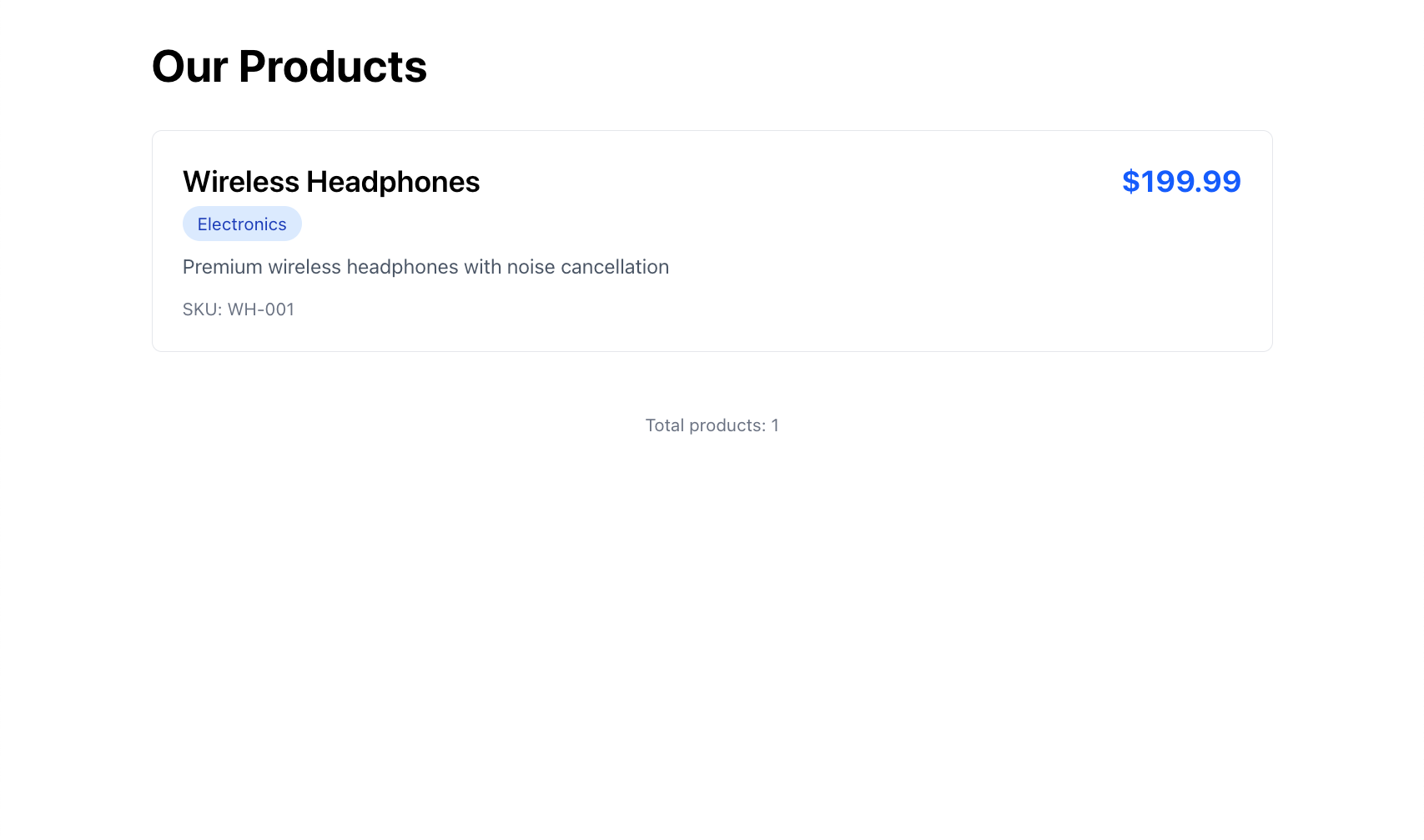
In development mode, Next.js fetches data on every request rather than at build time — so you can publish a new product in Webiny Admin, refresh the page, and see it immediately without rebuilding. When you run npm run build for production, Next.js executes the Server Component once and bakes the output into static HTML. The route shows up as ○ (Static) in the build output, meaning no server is needed at runtime and no API calls happen when visitors load the page.
Filtering and Sorting
listEntries supports server-side filtering and sorting. Here are a few examples you can try:
The where object uses the same filter operators available in the GraphQL API: _eq, _not, _contains, _startsWith, _gt, _gte, _lt, _lte, _in, and more.
Troubleshooting
Page Shows "Failed to load products"
The SDK call returned an error. Check:
- Your
.env.localhas the correctWEBINY_API_ENDPOINTandWEBINY_API_TOKENvalues - The API key has Read permissions enabled (Settings → API Keys in Webiny Admin)
- The dev server was restarted after updating
.env.local - The
modelIdin the code ("product") matches the Model ID in Webiny Admin exactly (case-sensitive)
Page Shows "No products found"
The SDK call succeeded but returned an empty list. Check:
- You have products created in Webiny Admin
- Those products are Published (not just saved as drafts) — the Read API only returns published entries
- You're viewing the correct locale (default:
en-US)
TypeScript Error on product.values.name
This means the generic type doesn't match the model. Verify:
- The
Productinterface inlib/types.tshas anamefield - The field ID in Webiny matches the property name (e.g.,
name, notproductName)
Build Fails with "Missing environment variables"
The error guard in lib/webiny.ts throws if env vars are missing. During npm run build, Next.js needs the env vars to be present. Make sure:
.env.localexists and has valid values- You're running the build from the Next.js project root
- If deploying to Vercel/Netlify, add the env vars in the platform dashboard
Summary
In this lesson, you fetched data from Webiny and displayed it on the homepage using Static Site Generation:
- ✅ Defined TypeScript interfaces for
ProductandProductCategory - ✅ Used
sdk.cms.listEntries<Product>()to fetch published products - ✅ Applied the Result pattern to handle success and error cases
- ✅ Rendered a typed product list using
CmsEntryData<Product> - ✅ Understood the difference between dev (per-request) and production (static) rendering
What's Next?
In the next lesson, we'll flip direction and write data to Webiny — building a contact form that creates entries in the CMS using sdk.cms.createEntry() and the Manage API.
It's time to take a quiz!
Test your knowledge and see what you've just learned.
Why does the Read API only return published entries?
Next lesson: Writing Data - Create a contact form that submits entries to Webiny using the SDK.