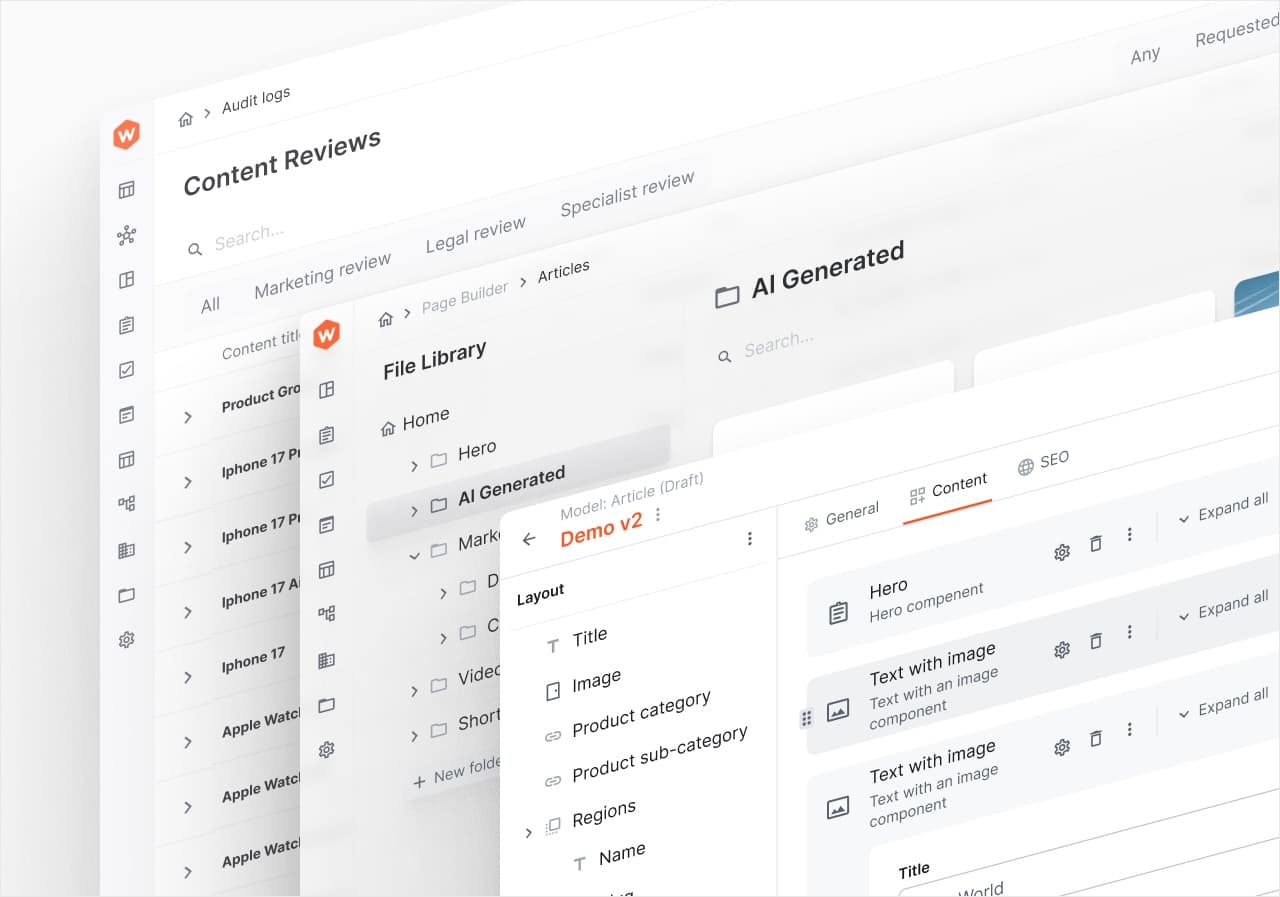
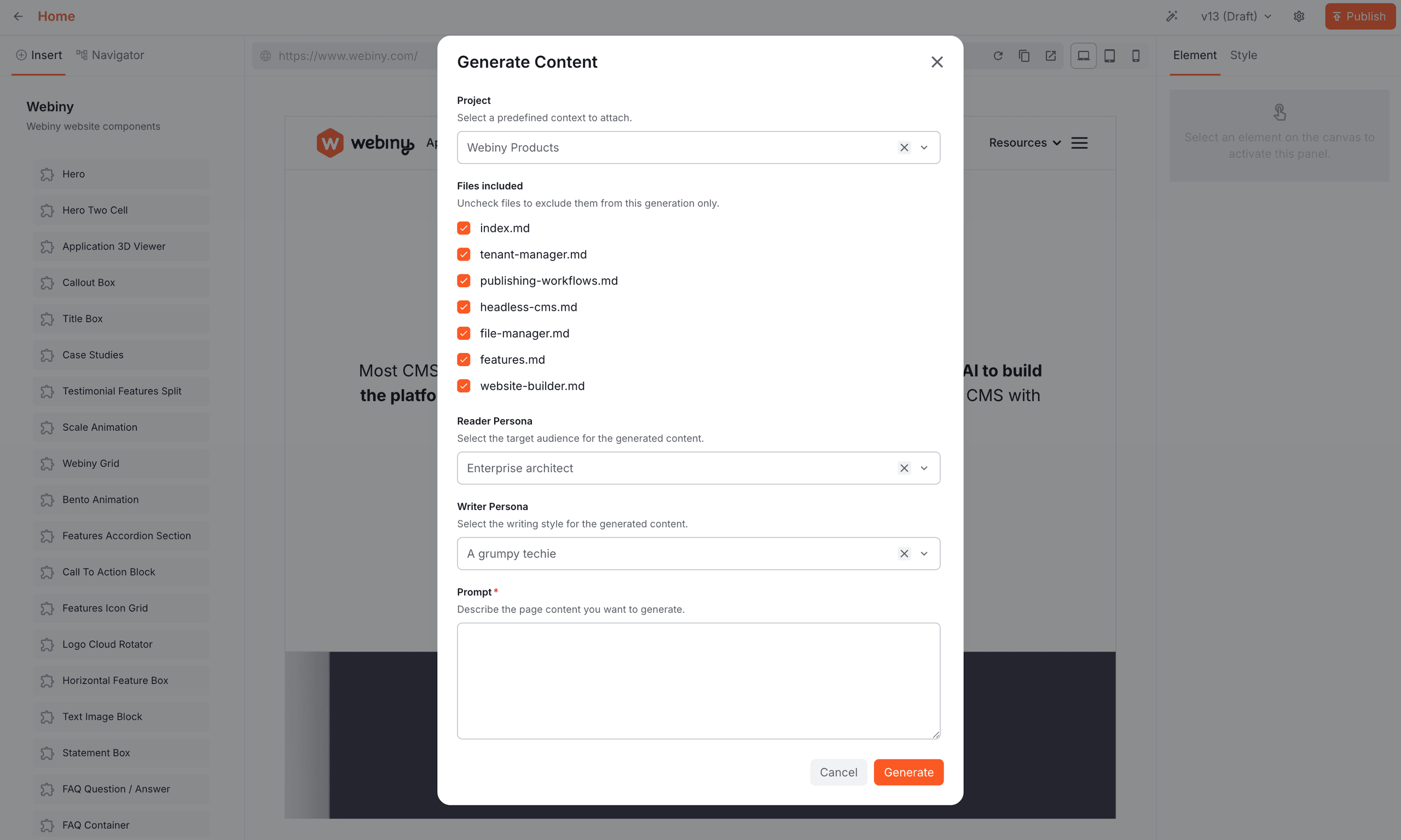
We recently shipped a feature in Webiny called AI Power-Ups. One of the power-ups is page content generation. You write a prompt: “a landing page for our new product launch”, and the model produces structured page content that drops straight into the editor, using your brand voice, your tone, your reference material, and most importantly, your own images and frontend components.
💡 Watch the full user journey on Youtube.
Users configure projects: bundles of writer and reader personas, instructions, and reference files like brand guides, product specs, and style documents. The model uses that context to generate output which strictly follows your company standards. The model also receives a catalog of frontend components it can use (banners, heroes, image galleries, etc.), and it knows how to populate those components with relevant data. To clarify, these components come from your Nextjs project which registered all available component definitions into the page editor. So this is a fully dynamic catalog.
This raises an important engineering question: how do you give an AI model access to a project’s worth of reference material without paying for it on every single request? And it’s A LOT of data, both structured and unstructured. Also, how do you give AI access to your media library without making your files public or sharing API keys?
Why “just put it in the system prompt” doesn’t scale
The naive approach is what everyone tries first. Load all the project’s files, concatenate them, paste them into the system prompt. Done. It works at a small scale. It breaks at a real scale, in three ways:
- Token cost grows linearly with project size. A project with twenty reference documents might be 80,000 tokens of context. Every generation pays the full bill, regardless of whether the request needed one document or all twenty. Most don’t need all twenty.
- Latency scales with what you send. Every byte travels over the wire, into the model’s context window. A 2-second generation becomes a 20-second generation, and your users feel it.
- Context dilutes. Models work better when the relevant information is prominent. Burying the one paragraph that matters under 79,000 tokens of unrelated material makes the output measurably worse. You’re paying more for a worse result.
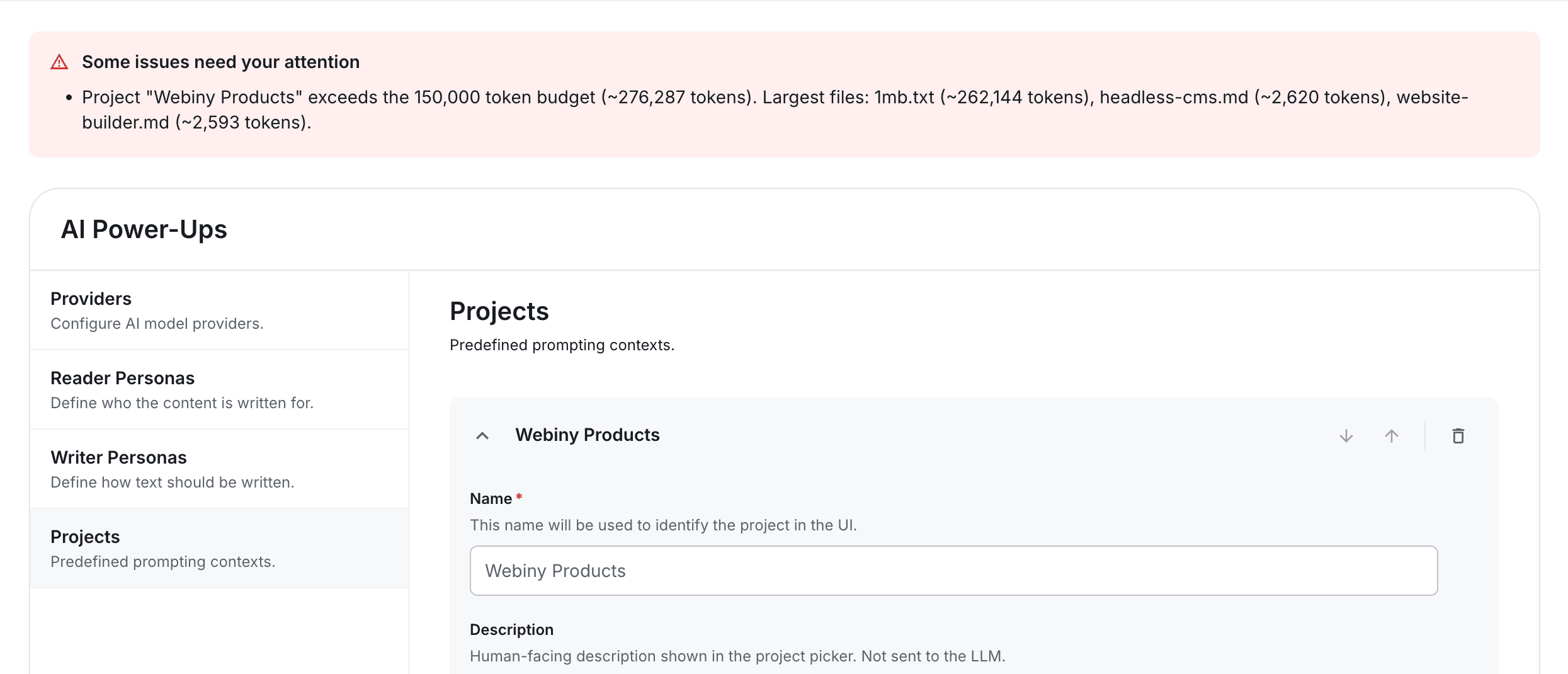
We hit this wall early. The project preset validator enforces a hard 150,000-token budget on combined instructions plus file size. This is something you tweak as you go, through trial and error. This also depends on how large your frontend component catalog is. If you have only 5 components, you can give more tokens to the instructions. If you have 55 components, the component catalog will consume a lot more tokens, so you have to balance the budget.
The fix isn’t a bigger budget. It’s a different architecture.
Context as something the model fetches, not something you push
The approach is simple to state, and the rest of this post talks about how it works:
The system prompt should advertise what’s available. The model should fetch what it needs.
Three principles arise out of that:
- The prompt is a manifest of capabilities, not a payload of content.
- The model decides what’s relevant per request. We don’t try to predict it in advance.
- We measure whether that decision is actually saving us anything.
If this sounds familiar, it should. It’s the same idea that got us frontend bundle splitting many years ago, or MCP servers more recently. Tell your model what’s available and let it dynamically fetch the content it needs.
A composable system prompt
The first architectural decision was to stop thinking of the system prompt as a single string and start thinking of it as a process. The LLM receives the initial input, then decides to call your tools in the background, and finally emits the final output. Each exchange adds a bit of latency, but it allows for very complex output to be generated.
From a purely engineering perspective, the prompt context builder assembles a prompt from independent sections: writer persona, reader persona, project. Each section is only emitted when it has data. Sections are implemented as a small class with one job: format itself, or produce nothing.
Personas and project instructions are simple strings, but the project context manifest is a bit more challenging to handle.
Descriptions come for free
Before we look at the manifest itself, we need to talk about where the file descriptions come from. Because without good descriptions, the rest of the architecture doesn’t work. The model can’t pick the right file to read if every entry says “(no description)”.
We solved this by piggybacking on how technical writers already work. When a user uploads a Markdown file to our File Manager, a before-create event handler runs. It parses the file’s frontmatter, lifts the description (or falls back to title) onto the file record, and pulls any tags onto the file as well. If the file isn’t Markdown, or already has a description, the handler is a no-op.
The architectural point isn’t the YAML parsing, it’s the integration. We didn’t add a “please describe your file” form field. We didn’t ask anyone to do anything new. Markdown authors already put frontmatter at the top of their files:
---
title: Brand voice guidelines
description: Tone, vocabulary, and phrases to avoid when writing customer-facing copy
tags: [brand, voice, style]
---

# Brand voice guidelines

...
That description was already there. We just made it visible to the rest of the system. By the time the file reaches the prompt manifest, it has a description, and the model has enough information to decide whether the file is worth reading.
This is a small thing that compounds. The manifest pattern is only as good as the descriptions in it, and descriptions are only as good as the path that produces them. Descriptions can be manually edited in the File Manager, but it’s always nice to automate and infer what you can, for better UX.
The manifest pattern
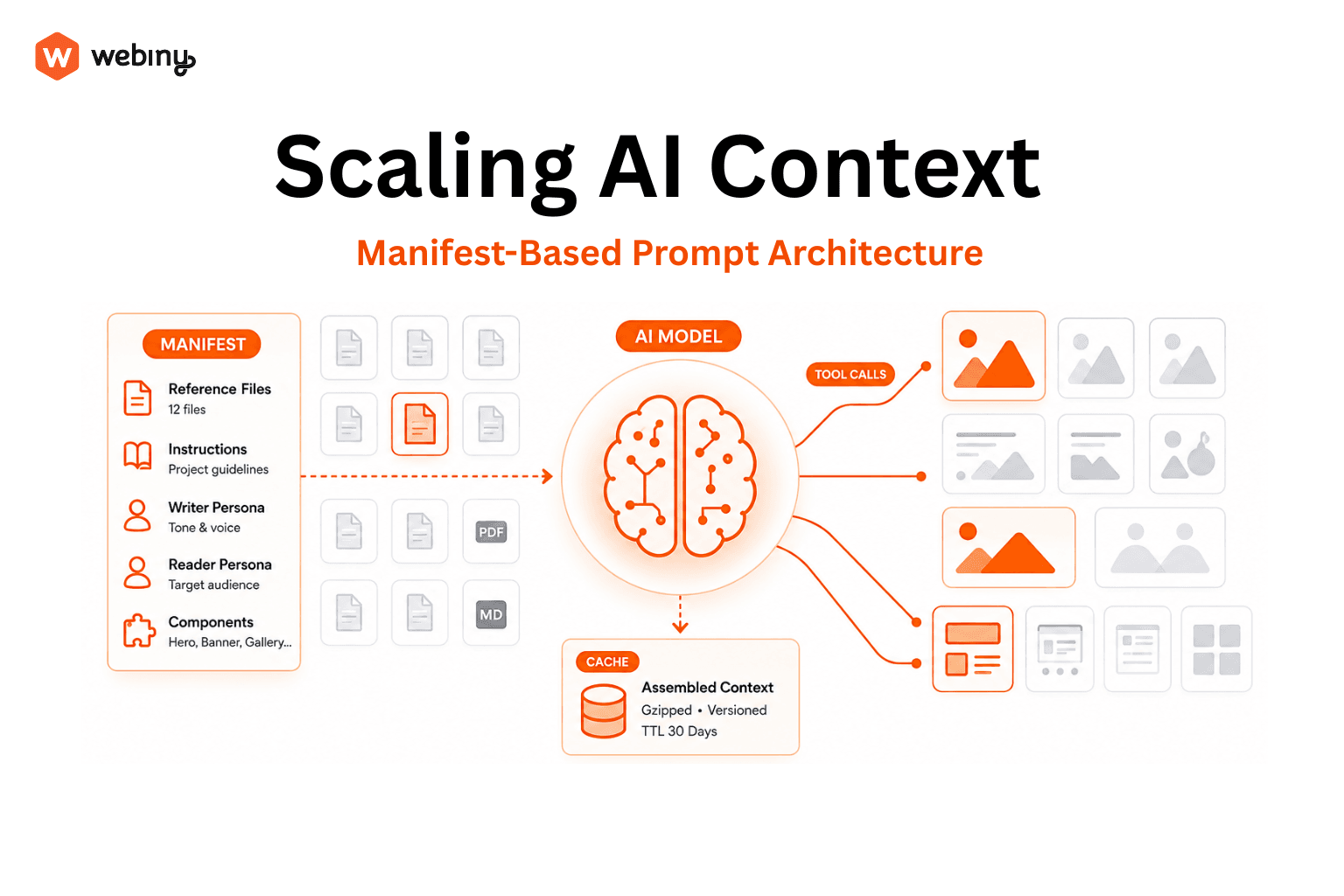
Now the core idea. Instead of file contents in the system prompt, we emit a manifest with everything an LLM can use to generate the response: instructions, tools, file references. The read_project_file tool is an important optimization aspect, and we cover it in the next section.
## Project: Acme Brand

(project instructions go here)

### Available reference files

You have access to 12 reference files for this project. Use the
`read_project_file` tool to read any file when its contents are relevant
to the user's request. Read files only when needed, do not read all files
preemptively.

Files:

- id: "f_01H..."
  name: "brand-voice.md"
  description: "Tone, vocabulary, and phrases to avoid when writing customer-facing copy"
  tokens: ~3400

- id: "f_01H..."
  name: "product-glossary.md"
  description: "Canonical product names, feature names, and how to capitalise them"
  tokens: ~1200

(...ten more entries...)
A project might carry 80,000 tokens of reference material. The manifest is maybe a 1,000. The model sees what’s available and decides what’s worth reading.
Two design choices are worth calling out:
The instruction is explicit and prescriptive. “Read files only when needed, do not read all files preemptively.” Without this, some models will helpfully read everything to be thorough, defeating the whole optimization. The instruction is part of the contract.
Token counts are included. The model uses these as a hint when choosing between files. If two files look equally relevant and one is 800 tokens and the other is 8,000, the cheaper one usually wins, which is what we want.
The tradeoff: we’re paying for occasional tool-call round-trips instead of unconditional context. In practice this is heavily favorable. A typical generation reads zero, one, or two files. We’ve replaced “always pay for twenty files” with “usually pay for one or two”. And LLM will only read files it considers to be the most relevant for the user’s prompt.
The tool that closes the loop
A manifest is useless without a way for LLM to act on it. We give LLM a tool read_project_file which it can use to request context depending on the user’s prompt. This is exactly like having an MCP server.
function createReadProjectFileTool(
    files: ProjectFileContent[],
    excludedFileIds: Set<string>
) {
    const fileMap = new Map(files.map(f => [f.id, f]));

    return {
        read_project_file: {
            description:
                "Read the full contents of a project reference file by its id.",
            inputSchema: z.object({
                fileId: z.string()
            }),
            execute: async ({fileId}) => {
                if (excludedFileIds.has(fileId)) {
                    return {error: "File excluded for this generation."};
                }

                const file = fileMap.get(fileId);
                if (!file) {
                    const availableIds = files.map(f => f.id).join(", ");
                    return {
                        error: `File not found. Available ids:${availableIds}`
                    };
                }

                return {content: file.content, name: file.name};
            }
        }
    };
}
This is the only code snippet that really matters. A few things to notice:
It’s a factory. The tool is constructed per request. The model can’t read anything outside its scope because the tool literally doesn’t have access. There’s no way to misuse a tool.
Errors are informative. When the model asks for a file id that doesn’t exist, the response lists the available ids. That single design choice saves an enormous number of failed generations. The model self-corrects in the same loop instead of giving up or hallucinating.
Exclusions live here too. Even if a file appears in the manifest by mistake, the tool refuses to read it if it’s excluded.
Tools are how lazy loading actually works for LLMs, and are a great way to expose your system to the LLM in a very secure and controlled manner.
When the manifest pattern doesn’t fit
The manifest pattern assumes the model can usefully read the content once it fetches it. That works for text, but not for images.
You can’t list 200 stock photos in a manifest and expect the model to pick well from filenames. You also can’t hand the model URLs into your media library, as that means exposing public links, API keys, or both. Generated content needs images, but the naive solutions are all bad.
We solved this with a two-stage pipeline that uses the same instinct as the file manifest, in a different shape.
Stage one: enrich at upload time.
When a user uploads an image, a background task runs. It sends the image to a vision model with a short, fixed prompt: “describe this image and return up to five lowercase tags”, and writes the resulting tags and description back onto the file record. The user does nothing. By the time anyone needs to use the image, it has structured metadata attached.
This is the same instinct as frontmatter extraction from the earlier section, applied to a content type where humans wouldn’t naturally produce metadata. A photographer doesn’t tag every photo they upload. They shouldn’t have to. Move the cost of describing content to the moment it enters the system, automate it, and the rest of the architecture has something to work with.
There’s nice symmetry here: we use an LLM to describe images so that a later LLM can choose them. The enrichment pipeline is the bridge between “image content” and “text reasoning.”
Stage two: give the model a query tool.
The page generator gets a list_images_by_tag tool:
class ListImagesByTagToolImpl {
    name = "list_images_by_tag";
    description =
        "Lists images from the media library filtered by a given tag.";
    inputSchema = z.object({
        tag: z.string().describe("Tag to filter images by")
    });

    async execute({tag}) {
        const result = await this.listFiles.execute({
            where: {type_startsWith: "image/", tags_in: [tag]},
            limit: 50
        });
        return result.value.items.map(file => ({
            id: file.id, name: file.name, description: file.description, type: file.type, tags: file.tags
        }));
    }
}
Notice that the tool only returns image metadata: id, name, tags, description. The model has to specify what it’s looking for: “launch”, “team”, “abstract-background”, and the tool resolves that to a list of candidates.
The flow from the model’s perspective looks like this:
- LLM describes what it wants in terms the system understands (tags).
- It gets back candidates with enough metadata to choose from.
- It references the chosen image(s) by id; the system resolves the id to a URL in the post-processing step.
The model never holds credentials, never sees raw URLs, never lists the library. It asks for a list of candidates and then chooses from what is available.
Compared to read_project_file, this is a different tool shape. It’s a query, not a fetch by id, but the idea is identical: the model describes a need, the system resolves it. Lazy loading isn’t one tool. It’s a relationship between what the model knows and what the model can ask for.
Controlling the agentic loop
Once you give a model tools, it can call them. Once it can call them, it can call them in a loop, and if you’re not careful, uncapped cost problem can arise.
We cap the loop at twenty steps. In practice, real generations use one to three steps - the manifest gives the model enough information to choose well on the first pass. Twenty is generous, not tight; it’s there to catch runaway behavior, not to constrain normal use. You can, of course, set the number you see fit for your project.
This is the kind of guard that costs nothing to add and is painful to be missing the one time you need it. If you’re shipping anything agentic to production, put a step cap on it. Pick a number, log when you hit it, and adjust based on what real generations actually need.
Estimating tokens without a tokenizer
The manifest displays token counts. The project validator enforces a token budget. Both need a way to estimate tokens from arbitrary text. The following image demonstrates a token budget validator in action: