Heads up! This article was written before Webiny 6.0 was released and may contain outdated information.

Adrian Smijulj
Heads up! This article was written before Webiny 6.0 was released and may contain outdated information.
Webiny is the AI-programmable CMS that gives enterprises full control. Build, extend and automate your content operations with a platform designed to be shaped by both developers and AI agents.
The AWS Lambda service allows us to easily deploy and run our own code, without worrying too much about the underlying infrastructure (when compared to non-serverless technologies). It essentially scales infinitely (with great power comes great responsibility), and can be connected with a bunch of other services, like API Gateway, S3, AppSync, DynamoDB, etc.
And usually, the thing people first start creating with the service are good-old HTTP APIs, like for example REST or even GraphQL. In those situations, since the actual users (potential customers) are the ones who will be invoking your Lambda functions, it's important that they are responding as fast as possible - meaning, we want to have function cold starts as short as possible, and afterward, make our code execute necessary logic in the most efficient way.
How to ensure that is the case? Well, that is the topic of this article, in which we'll cover five tips that can help you in that regard. So, without further ado, let's take a look!
Allocating more RAM to a function means faster execution. That's true. But it also means you pay more, right? Well, it depends. Sometimes that's actually not true.
Consider these two 512MB RAM and 1024MB RAM Lambda function CloudWatch logs. The billed durations from the logs are also shown in the following chart:
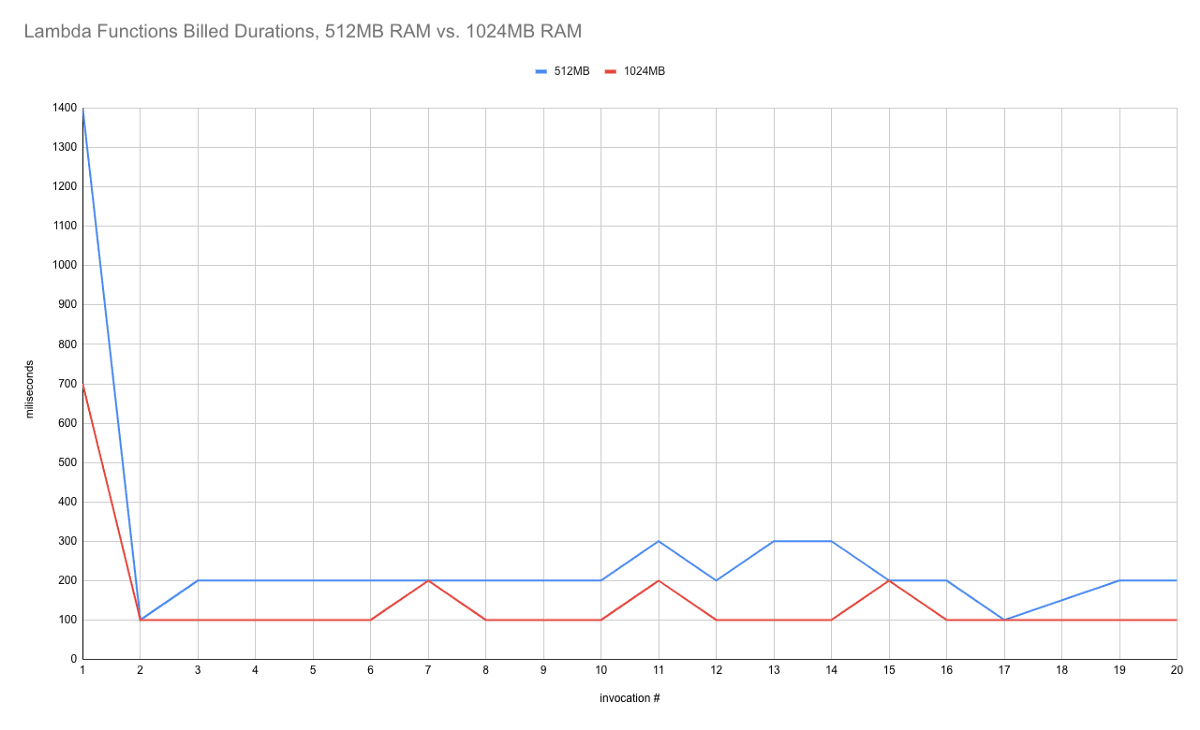
So, what we can see here is that with the 512MB of RAM Lambda function (blue), the billed duration is most of the times 200ms. But, with 1024MB of RAM (red), which is 2x more, the billed duration gets reduced to 100ms, which is 2x less. Even the initial invocation's duration (the cold start one's) got reduced from 1400ms to 700ms.
Effectively, this means we're getting faster functions, for the same price!

But do note, the results may vary depending on the task the function is performing. For example, in some cases, you might not achieve the reduction big enough for the price reduction to happen. In other words, if you manage to reduce the invocation duration from 140ms to 105ms, this is good, but still, doesn't change the price, since the billed duration on both invocations is 200ms.
Before bumping up RAM, do test your function with different payloads, and then based on the results, determine if there are any actions worth taking.
The larger the function in size, the longer the cold start. There is a
Based on that fact, the advice I wanted to give here is - watch out for function size. Try to use as few external packages as possible. Be aware that every package you include in your function can also bring additional dependencies with it, making it even worse.
With that, also be careful about how you actually import packages. If there is a way to import just a specific functionality, do that, instead of importing the entire package.
For example, when using the
Do not import the whole AWS SDK like so:
import { CloudFront, Lambda } from "aws-sdk";
Instead, do it like this:
import CloudFront from "aws-sdk/clients/cloudfront";
import Lambda from "aws-sdk/clients/lambda";
This approach can significantly affect the final bundle size, so again, watch out!
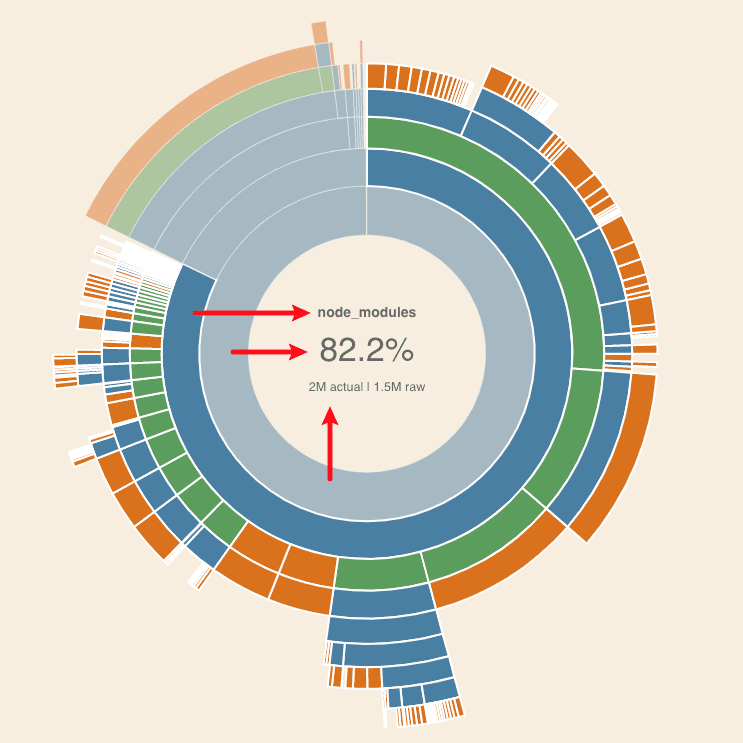
There are a couple of useful tools I like to use in order to inspect what the 3rd party package is bringing to the table (or should I say - removing from the table).
One of the tools is the (
The other one is the
Wait, Webpack bundle?
Yes! Bundling your functions with Webpack is also recommended, since not only that'll make your function a single file, but will also make sure only the code that's actually utilized gets into the build, which naturally reduces the final file size.
Configuring Webpack could be a bit daunting task, but it's definitely worth it at the end of the day. Luckily, with every
Some of you might already know that calling another Lambda function within a Lambda function is often considered as an anti-pattern, and yes, this is definitely true in certain cases. The main reason is that, while the other function is processing the invocation payload, the first function is idle and just waiting for the response, meaning you're effectively paying for nothing.
Yes, you can also invoke functions asynchronously, without waiting for the invocation to complete (using the
Let's consider the following example, where I believe calling another Lambda function from the first one (and waiting for the response) can be considered as a good approach.
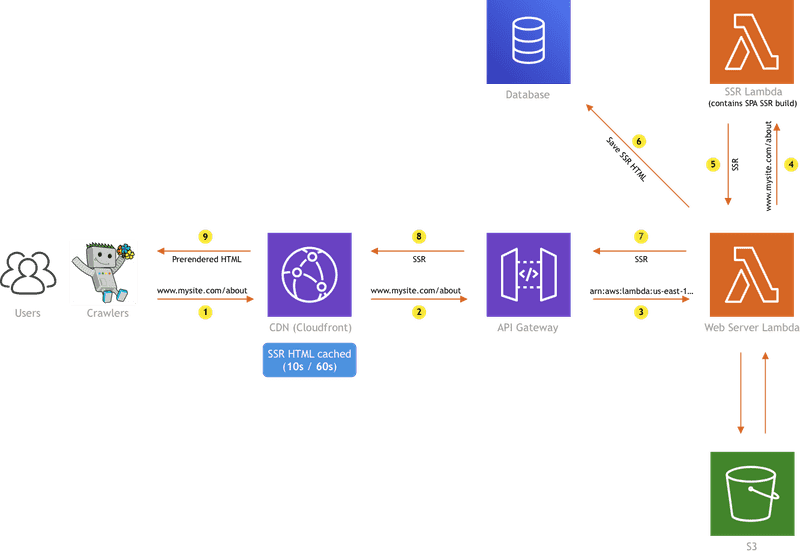
The diagram above is showing the SSR implementation we did at Webiny, which consists of a couple of AWS resources: CloudFront, API Gateway, S3, two Lambda functions, and a database.
I won't go too much into the details here (feel free to check the
But, if there is no SSR HTML in the database, we need to generate it, which is actually an intensive process, and executing it with 256MB of RAM simply won't cut it. So, instead of just bumping the Web Server Lambda's RAM, we are invoking the SSR Lambda function, which contains a lot more system resources (for example - 2 GB RAM), and we're only paying for that when we actually need it. It would simply be a waste of money to have the Web Server Lambda configured with the same amount of resources, just to pull some data out of the database, most of the time. This way we can save a significant amount of money in the long run.
You can also do this if you have a Lambda function that's heavy in size, just because of a 3rd dependency that needs to be there, but still, isn't utilized that often.
For example, one of the apps that Webiny offers out of the box, the
Since that's the case, we decided to extract the installation functionality completely from the main Page Builder API function, and place it into a separate Page Builder Installation function.
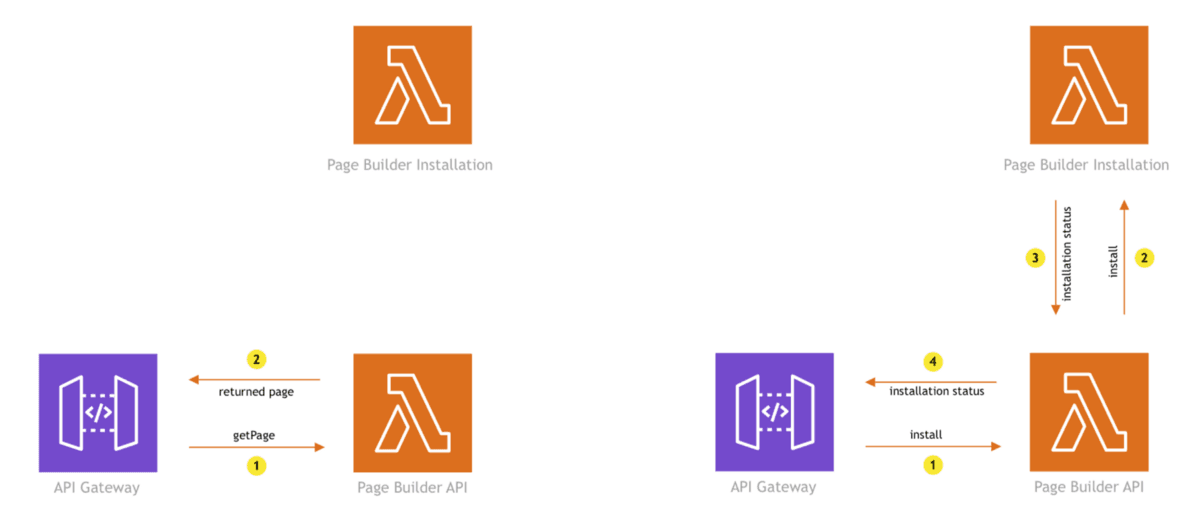
With this organization, we are not burdening the main Page Builder API function with redundant packages, which helps in reducing its size, and naturally, affects the duration of cold starts.
To conclude, whenever you have an intensive process, that either needs more system resources or requires additional packages that increase the overall function size, try to extract it into a separate function, especially if the process is rarely triggered.
The following tip is a short one, yet effective one, and can be applied not only when talking about Lambda functions, but coding in general.
If possible, execute code in parallel, not in series. For example, if we needed to do five 100ms operations, doing it in series means it would take a total of 500ms to complete.
const operations = [a, b, c, d, e];
for (let i = 0; i < operations.length; i++) {
  await operations[i](); // 100ms operation.
}
Instead of doing it in series, try doing it in parallel, using the Promise.all method, like so:
const operations = [a, b, c, d, e];
const promises = [];
for (let i = 0; i < operations.length; i++) {
  promises.push(operations[i]());
}

await Promise.all(promises); // 100ms operation.
Doing this will decrease the function invocation duration and naturally, reduce the overall cost!

Last but not least, if you're making HTTP requests within your Lambda function's code, it's useful to
By default, the default Node.js HTTP/HTTPS agent creates a new TCP connection for every new request. To avoid the cost of establishing a new connection, you can reuse an existing connection.
This can be especially handy for clients like DynamoDB, where we really need the HTTP request latencies to be as low as possible.
A good article on the actual performance boost that this option introduces was already written by the great Yan Cui, in his article - Lambda optimization tip - enable HTTP keep-alive. As we can learn, without HTTP keep-alive, the duration of DynamoDB operations averaged around 33ms, while with the option enabled, the average duration dropped to 10ms!
The somehow shocking fact about establishing new TCP connections is that the actual establishment takes more time than the actual client operation we're trying to execute! So when you think about it, deciding whether this option should be enabled or not is almost a no-brainer.
By almost completely abstracting the infrastructure concerns from us and with that, reducing the overall development and maintenance cost, the AWS Lambda (and serverless technologies in general) truly does make our developer lives easier. But as we've seen, there are still a couple of tricks that are useful to know and which can help us in optimizing our workflows even further.
I hope the five tips we've shown here will help you in your serverless journey, but, of course, if you have any further questions, concerns, or ideas, feel free to ping me over
Thanks for reading! My name is Adrian and I work as a full stack developer at Webiny. In my spare time, I like to write about my experiences with some of the modern frontend and backend web development tools, hoping it might help other developers. If you have any questions, comments or just wanna say hi, feel free to reach out to me via Twitter.

