Website Builder > How It Works
How It Works
Understand the Website Builder architecture and how it connects to your frontend app
- How does the Website Builder editor connect to your frontend app?
- Where do components and styles live?
- What role does the Webiny SDK play?
Overview
The Website Builder uses a unique architecture that separates content management from presentation. The editor runs in Webiny Admin and connects to your frontend app via an iframe. Your app owns all components and styles—Webiny only stores the page structure.
Webiny currently provides out-of-the-box support for Next.js through the @webiny/sdk-nextjs SDK. Support for additional frameworks is planned for future releases.
This approach ensures genuine WYSIWYG editing, no style conflicts, and full control over your frontend code.
Architecture
The Website Builder consists of two separate parts:
Webiny Admin - The editor interface where content creators build pages by dragging components, configuring inputs, and publishing. The editor loads your Next.js app inside an iframe to provide live preview.
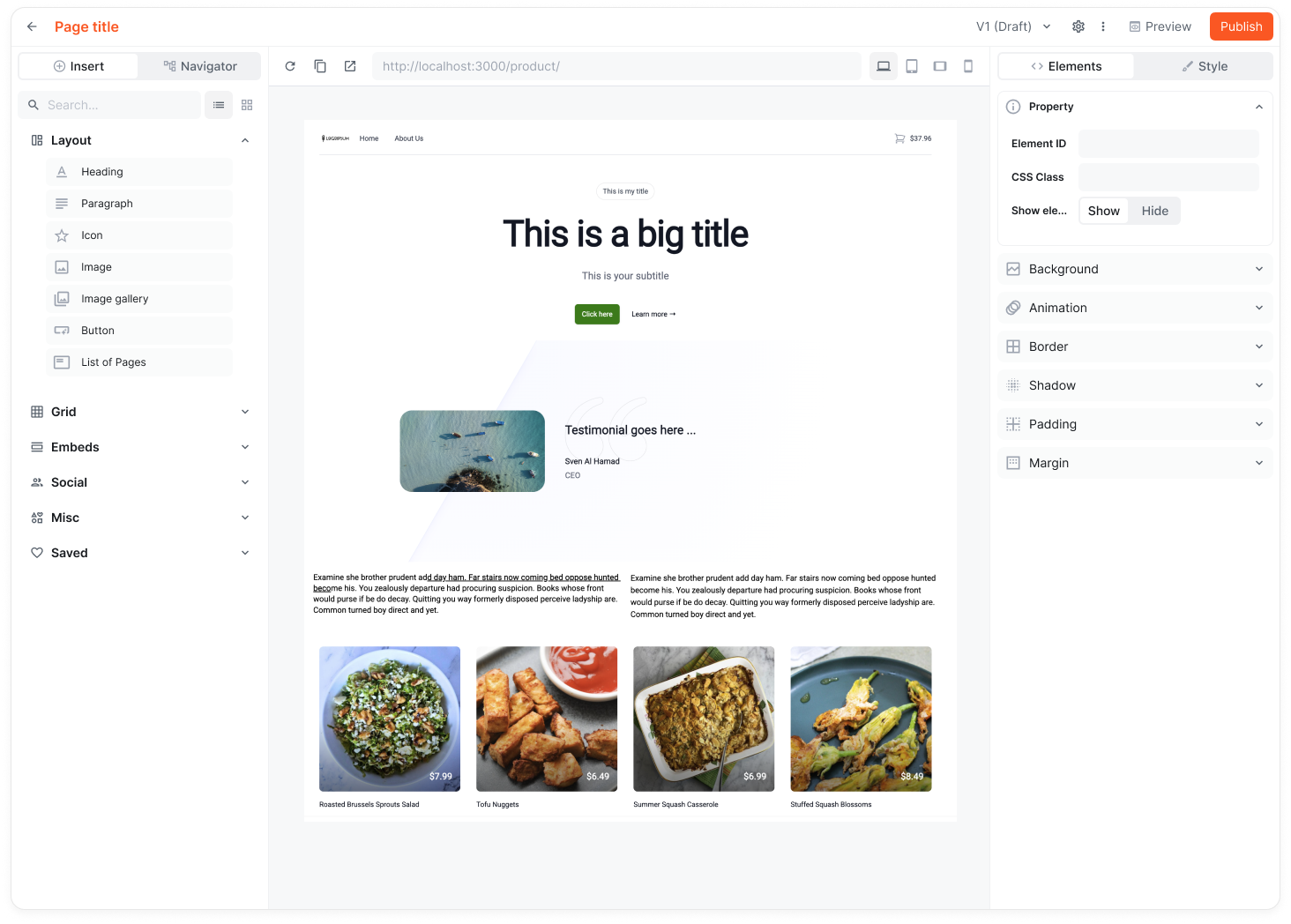 Website Builder editor interface showing component palette, canvas, and inputs sidebar
Your Frontend App - Your frontend application with the Website Builder SDK installed. Currently, Webiny provides the @webiny/sdk-nextjs SDK for Next.js out-of-the-box. Your app contains all component code, styles, and rendering logic.
How They Connect
┌──────────────────────────────────────────────────────────┐
│  Webiny Admin                                            │
│                                                          │
│  ┌────────────────────────────────────────────────────┐  │
│  │  Website Builder Editor                            │  │
│  │                                                    │  │
│  │   sidebar     ┌──────────────────────────────┐     │  │
│  │   (inputs)    │  your frontend app (iframe)  │     │  │
│  │               │  real components             │     │  │
│  │               │  real styles                 │     │  │
│  │               └──────────────────────────────┘     │  │
│  └────────────────────────────────────────────────────┘  │
└──────────────────────────────────────────────────────────┘
                        ↕ postMessage (SDK)
┌──────────────────────────────────────────────────────────┐
│  Your Frontend App (running separately)                  │
│  Website Builder SDK installed (Next.js currently)       │
└──────────────────────────────────────────────────────────┘
The SDK handles communication between the editor and your app using the browser’s postMessage API. When editing, the editor sends component configurations to your app. When rendering for visitors, your app fetches published page data from Webiny’s API.
What Webiny Stores
Webiny stores only the page structure—which components are on the page and what input values editors configured for each component. It does not store component code, styles, or rendering logic.
Example page structure stored in Webiny:
{
  "path": "/about",
  "title": "About Us",
  "components": [
    {
      "type": "Hero",
      "inputs": {
        "title": "Welcome to Our Company",
        "subtitle": "Building great products since 2020"
      }
    },
    {
      "type": "TextBlock",
      "inputs": {
        "content": "<p>Our story begins...</p>"
      }
    }
  ]
}
Your Next.js app knows how to render Hero and TextBlock components—Webiny just passes the configuration.
What Your App Owns
Your frontend app owns everything related to presentation:
Component Code - All React components live in your codebase. You define component anatomy, inputs, and rendering logic.
Styles - All CSS, Tailwind classes, or CSS-in-JS lives in your app. No style conflicts with the platform.
Rendering Logic - Your app decides how to render components, handle responsive design, and optimize performance.
Theme Configuration - Colors, fonts, spacing, and other design tokens are defined in your theme files.
This separation means you have complete control over your frontend stack. Use any React patterns, styling approaches, or performance optimizations you need.
SDK Responsibilities
The Website Builder SDK provides:
Editor Integration - Handles communication between the Website Builder editor and your app during editing sessions.
Page Fetching - Fetches published page data from Webiny’s API when rendering pages for visitors.
Component Registration - Provides utilities to register your components so they appear in the editor’s component palette.
Rendering Utilities - Helps render page components with the correct inputs and layout.
Webiny currently provides the @webiny/sdk-nextjs SDK for Next.js. The SDK is a thin layer that connects your app to Webiny without imposing constraints on your architecture.
The Website Builder SDK is not designed for shared runtime environments — environments where a single process handles multiple concurrent HTTP requests, such as a Node.js server running in a container.
When it comes to Next.js, the SDK works correctly with Vercel or OpenNext because both platforms use serverless functions or Lambda for SSR, where each HTTP request runs in an isolated function invocation. In a shared runtime, concurrent requests may overwrite each other’s SDK state.
If your deployment target is a container or any long-running server process, ensure your SSR runtime provides per-request isolation before using the SDK.
Benefits
Genuine WYSIWYG - Editors see your actual app with real styles, not a simulation.
No Style Conflicts - Your styles never clash with platform styles because the platform has no styles.
Full Control - Use any React patterns, build tools, or deployment strategies.
Version Control - All component code lives in your repository alongside your application code.
Performance - Optimize your frontend however you want—static generation, server rendering, client hydration.